Send E-Mail & File Attachments Using MAPI
Using MAPI (Messaging Application Program Interface)
you can easily mail enable your applications. This sample shows how to send
e-mail to multiple recipients. You can address the e-mail TO a
recipient, CC (Carbon Copy) or BCC (Blind Carbon Copy)
recipients. You can also include one or more file attachments.
Download Source Code
VB includes the MAPISession and MAPIMessage
controls so you can mail enable your applications. This sample, however, goes
straight to the API and uses the MAPI commands directly.
The first step is to verify that the PC your app is running on has MAPI
installed. In most cases it will. This sample looks at the Win.ini
file and reads the MAPI value found in the
[MAIL] section. Reading this is straight forward using the
GetPrivateProfileString API. If MAPI=1, then MAPI is
installed.
I looked in the Win.Ini file because it still exists in Windows 2000 and XP and
I only had a few minutes to put this sample together. By right, you should read
the Registry at HKLM\Software\Microsoft\Windows Messaging
Subsystem\MAPI. Again, if MAPI="1", MAPI is installed.
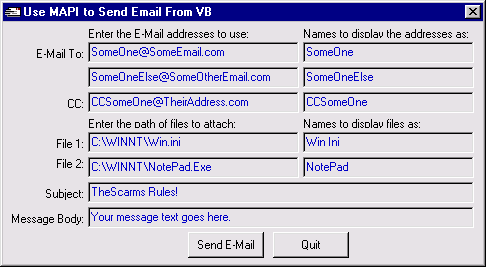
The sample program is very simple. It allows you to enter a few recipients, a
subject, text for the body of the e-mail and the path for two files to attach.
When you click the Send button the program populates a few MAPI
structures, establishes a MAPI session then sends the e-mail.
The first structure to fill is the MapiRecip UDT.
You must populate one of these structures for each e-mail recipient. Based on
the number of recipients you enter into the program's main form, an array of
this type is created. For each recipient a few pieces of information are set.
The Address is the recipient's actual email address. To display a more
user friendly name in the e-mail instead of the actual address, the Name
field is used. Lastly, the RecipClass field specifies if the recipient
is a TO, CC or BCC recipient.
The next structure is the MapiFile UDT. Similarly,
you must populate one of these structures for each e-mail attachment. Based on
the number of files indicated on the program's main form, an array of this type
is created. For each file the UDT's Path, user friendly FileName and
Position values are set.
To send attachments via MAPI, you must specify a position for the attachment in
the message body. Therefore, the body must not be empty. The attachment
replaces the character at the specified location in the message text.
The last structure is the MAPIMessage UDT which
pulls everything together. This is where you specify the number of recipients
in the MapiRecip array, the number of files in the MapiFile array and the text
for the e-mail's subject and body.
All that remains is to send the message. A call to MAPILogon
is made to establish a MAPI session and return its ID. To send the message,
MAPISendMail is invoked. This command uses the session ID and
addresses of the recipient and file arrays as parameters. To send the mail
without any dialogs, pass a zero in the sixth or Flags parameter. To
display the e-mail prior to sending it, use MAPI_DIALOG instead.
That's it. Just call MAPILogoff to terminate the
MAPI session and you are done.
Download this project and run it. Enter a few recipients with and without
display names. Do the same for file attachments. Type in your subject and body
then click Send.
|