Set File Creation, Modified, Last Accessed Dates
Often times you may need to touch a file by setting
its Created, Modified or Last
Accessed date and time. This sample shows how to do it.
Download Source Code
| Read File Creation, Modified, Last Accessed Dates
|
The program starts by reading current file times from an existing file. It does
this by opening the file with a call to CreateFile
using GENERIC_READ access and a share mode of
FILE_SHARE_READ Or FILE_SHARE_WRITE. Since the
file exists, the creation disposition of OPEN_EXISTING
is used.
The file handle returned by CreateFile is passed to the GetFileTime
API which retrieves the created, accessed and modified times in corresponding
FILETIME structures. A FILETIME structure is a 64-bit value
representing the number of 100-nanosecond intervals since January 1, 1601. A
call to CloseHandle closes the file.
The FileTimeToLocalFileTime API converts the time
in our FILETIME structures based on the computer's local settings for time zone
and Daylight Savings Time.
Lastly, the file times are converted into a more friendly format. A call to
FileTimeToSystemTime converts the FILETIME structure to a
SYSTEMTIME structure which represents a date and time using
individual fields for month, day, year, hour,... These fields are then
concatenated together and displayed as a normal date/time value.
| Set File Creation, Modified, Last Accessed Dates
|
Setting filetimes is very similary to reading them with a few exceptions. A call
to SetAttr is used to set the file's attributes to vbNormal.
This removes the read-only flag if set. Also, GENERIC_WRITE
access is specified in the CreateFile call.
The date to set is converted to a FILETIME value by parsing it into a SYSTEMTIME
structure then using SystemTimeToFileTime to
return the FILETIME. The local time conversion is performed and we are ready to
invoke SetFileTime to set the dates.
SetFileTime takes as parameters the handle to the file and FILETIME structures
for creation, last accessed and modified times. To leave a particular time
value as is, leave the corresponding value null. After this command the file is
closed and the original attributes are reapplied.
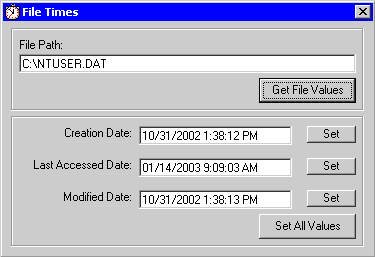
Download the project and press F5 to run the program. Enter a valid path to a
file and click Get File Values to retrieve the file's current date/time
values.
Enter a new date/time values and click the Set buttons to set the
value(s). Right click the file and select Properties in Windows Explorer
to verify the new values.
|