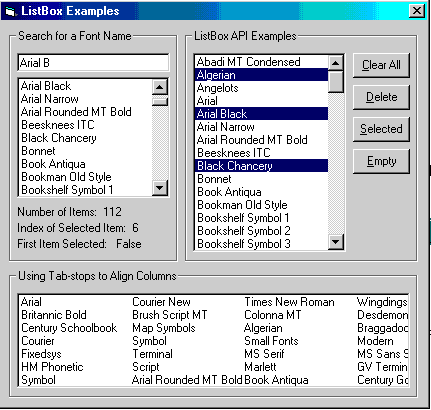
ListBox Functions: Set Tabs, Add, Remove, Select Items....
Using the SendMessage API function you can perform
all of Visual Basic's intrinsic operations on a ListBox. As this program shows,
you can add and delete items, determine the number of items or the number of
selected items in a multi-select ListBox, see if a particular item is selected,
deselect items, empty the ListBox,....
You can even set TAB Stops to neatly align
columns of data or Right Align data,
something you can't do in a multi-column ListBox. Or how about this:
Automatically locate any iti as you type it in. Just like
when searching for a Help topic.
Best of all, these functions are faster than the intrinsic methods. Looping
through all items to find a specific one is inefficient. You can quickly
find the value with a single API call. By the way, this stuff works for
Combo and Text boxes too (with a few exceptions).
Download Source Code
To set TAB stops in a ListBox you must create an array of type Long. The array's
upper bound dictates the number of tab stops.
Tab stops are defined in terms of "dialog units". While the GetDialogBaseUnits
function combined with a simple calculation can be used to convert between
dialog units and pixels, the easiest way to set tab stops where you want is by
trial and error. The SendMessageArray is just a type safe version of the
SendMessage API function. See the source code for details.
   Dim aTabs(3) As Long
   aTabs(0) = 75
   aTabs(1) = 150
   aTabs(2) = 225
   '
   'Clear any existing tabs.
   '
   Call SendMessageArray(lstTabs.hwnd, LB_SETTABSTOPS, 0&, 0&)
   '
   'Set the tabs.
   '
   Call SendMessageArray(lstTabs.hwnd, LB_SETTABSTOPS, 3&, aTabs(0))
To Right Align a column, such as a column of numbers, set tab stops as
described but make the tab stop a negative number. In the above example,
the right justify the first column, set aTabs(0) to -75.
Download the project and run it.
Start typing the name of a font in the Search for a Font Name textbox. As
you type, hit the Back Space key and watch the search move backwards up the
list. Try deleting the first letter of what you typed and see what happens.
Clicking an item adds it to the TextBox and displays its index.
The ListBox API Examples Listbox is multi-select. Use the CTL and SHIFT
keys to select multiple items. Press Clear All to unhighlight them or Delete
to remove them. Clicking the Selected button tells you how many you
highlighted while Empty clears the Listbox.
|