Call the Microsoft Word Spell Checker
This sample shows how to add spell checking and thesaurus capabilities to your
VB application using the Microsoft Word Object Library.
Download Source Code
To use the MS Word spell checker, a variable of type Word.Application
is declared and a call to the CreateObject function
is made to create an instance of MS Word. The instance has its visible and
windowstate properties set so MS Word is not visible to the end user.
Next, a new document is created within the MS Word
application.
A loop is entered which parses the text entered into the textbox into space
delimited words. For each word found, a document range
is defined and its content is set to the word just parsed out.
A call is then made to the document's SpellingErrors
method which checks the word and returns a collection of misspelled words. If
the collection's count property is greater than zero, the suggested replacement
words are sought.
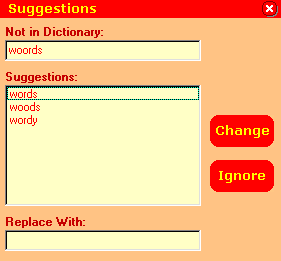
A call to the application's GetSpellingSuggestions method,
passing in the incorrectly spelled word, populates a SpellingSuggestions
collection of suggested replacement words. This collection is enumerated and
its contents are added to a listbox so the user can select a replacement word.
Once a new word is chosen, it replaces the bad word in the textbox and the
parsing continues.
Using the thesaurus is a bit simpler. Instead of parsing the entire text, you
highlight the single word to check. As before, a range is created and
populated. Then a call the document's CheckSynonyms
method is made. This method displays its own selection dialog. Once a new word
is selected, the range's content is used to replace the original word.
This program references the Microsoft Word 8.0 Object Library. If you are
running a different version of Word, select the correct object library from the
Project | References menu.
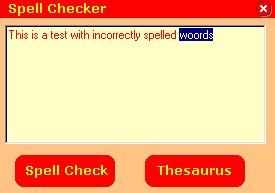
Run the program and enter some text with a few incorrectly spelled words into
the textbox. Click the spell check button and select the correctly spelled word
from the list of suggestions. You can also enter in your own word.
To use the thesaurus, enter some text, highlight a word, and click the thesaurus
button.
|