Play Wave Files and Adjust Their Volume
Open and Close the CD Tray
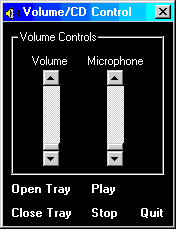
This program shows how to play a Wave file using
the PlaySound API function and illustrates how to
adjust the waveout volume from within Visual Basic.
It also uses the mciSendCommand function
to open the device associated with the default CD/Audio. Once the device
is opened its ID is returned. mciSendCommand is
used to send a message to the device telling it to open its door. Closing the
CD tray is done in the same way just with a different message. Finally, when
the program exits, a close message is sent to close the device.
All functions used are provided by winmm.dll.
Download Source Code
This program uses Microsoft Common Dialog Control 6.0 and will not run under
older versions of Visual Basic unless you have VB6 installed or change the
sample to use an older version of the common dialog.
Download the project and press F5 to run it. Open your volume control
application. Move the volume slider in my application and watch the slider move
in your program.
Click the Play command and select a .wav file to play
|

About TheScarms
Sample code
version info
|