Safely Shut Down a Running Application
The Shell command makes it is easy to start an
application from Visual Basic. Stopping it is a harder. Many
samples use the TerminateProcess function to stop
the application. This is dangerous since the application will be shut
down abruptly and a loss of data may occur. Even the TerminateProcess
documentation warns you not to try this except as a last resort.
Download Source Code
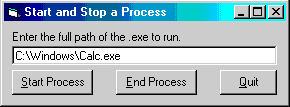
This program uses the intrinsic Shell command to
launch the application whose path you specify. Returned by the
Shell command is the Process ID or PID of the shelled
application. When you click the End Process button, this program
enumerates all top level windows in the system and stores the handles of those
windows associated with the shelled application in a collection. It then
loops through the collection and sends the WM_CLOSE
message to each window using SendMessage.
WM_CLOSE instructs the windows to close in their
normal fashion as if you manually closed them. The window may display a
confirmation dialog depending on how it handles the close message. To
avoid being asked to confirm closing the window, you can send the
WM_DESTROY command instead.
For a description on how to enumerate the top level windows using the
EnumWindows API, see my Enumerate all top
level windows program. To check which windows are associated
with the process we want to stop, the GetWindowThreadProcessId
function is called. As its name implies this API returns the Process ID
for a given window. If the PID matches that of the shelled application,
the window handle is written to the collection.
In many situations you do not know the PID of the application to shut down
because you didn't start it. By enumerating the windows you can
compare their captions to that of the application to stop. Again, once
you have the handle of the window with a matching caption you can use the
GetWindowThreadProcessId function to get its PID. All of this
is demonstrated in my enumerate top level windows sample.
Download the source code and press F5 to run the program. Enter the full path of
the application to start. Click the Start Process button to run the
application. You can then minimize or hide the application. When you want to
terminate it, simply click the End Process button.
|