Determine if an Application has Stopped Responding
This example illustrates how to determine if an application is hung or has
stopped responding. There is no clear definition of an application hanging.
Typically the application is busy processing. But from a user's standpoint it
has stopped responding.
Using the SendMessageTimeout function you can see
if the target application is responding. Then you can terminate it if it is
not.
Download Source Code
| Getting an Application's Handle
|
First, we need the handle to a window in the application whose status we want to
check. This program gives the option to start either Internet Explorer or
another application. In the process of starting the application we can retrieve
its handle.
To start Internet Explorer an instance of Internet Explorer's application object
is created and its visible property is set true. The window handle is available
as a property of the IE object. To start another application the Shell command
is used to launch the specified executable. The Shell command returns the
process ID of the application it started. Knowing the process ID we can examine
all top-level windows in the system until we find one whose process ID matches
that from the Shell command.
To examine all windows we use the EnumWindows API to
enumerate all of the existing windows. When you issue EnumWindows
you pass it the address of a public function defined in your code using the
AddressOf operator. This callback
function, which I named fEnumWindowsCallBack, must reside in a .bas module. The
operating system calls your function, fEnumWindowsCallBack in this case, for
each window and passes it the handle of the identified window.
EnumWindows continues until the last top-level window is enumerated
or the callback function returns False. For
more details, see my Enumerate Windows program.
As each window is passed back to fEnumWindowsCallBack the GetWindowThreadProcessId
function extracts its process ID. When the process ID matches that from the
shell command the enumeration is stopped and the window handle is stored.
| Checking if an Application is Hung
|
Once the window handle is known it is used in the SendMessageTimeout
function along with the SMTO_ABORTIFHUNG and
SMTO_BLOCK flags. If the application appears to be hung,
SendMessageTimeout returns with a zero value. A timeout period can
be specified. I used a value of 1 second.
| Terminating an Application
|
To stop an application that is not responding, the TerminateProcess
API is used. TerminateProcess unconditionally
ends a process. While this is fine when the app is hung, it should only be used
as a last resort with a running application. TerminateProcess
will prevent the application from closing open files and shutting down in an
orderly fashion. To close a program that is still responding, see my
Safely Stop a Running Process example.
Download this project and run it.
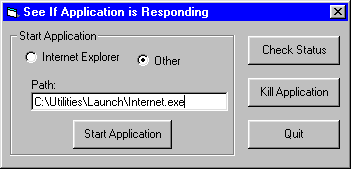
To check the status of Internet Explorer select the appropriate option and click
the "Start Application" button. Then hit the "Status"
button to display a status of responding. Enter a URL that causes
blocking and click "Status" again. Now you should see the "Not
Responding" message when you click the "Check Status"
button.
To check the status of another application, select the corresponding option,
enter the full path to the application's .exe and start the application. Now,
have the application perform a task that takes a long time to complete. While
the application is processing click the "Check Status" button. The
appropriate message will display.
To end the application, press "Kill Application".
|